Every move you made, finally in one place
Knowing your portfolio is not the same as being able to account for every move you made in it. The Transactions Report unifies every buy, sell, dividend, fee, tax, and FX event across every broker and asset class into a single, filterable, downloadable ledger.
For investors who need every record in one place
If you've ever opened five broker tabs at tax time and started reconciling CSVs, this report is for you.
Multi-broker investors
Accounts across three or four platforms — and never a unified history of what happened where.
Anyone who has fought CSVs at tax time
Different formats, different date conventions, different currency handling. Reconciliation by hand, every year.
Investors auditing fees and taxes
The costs that performance figures absorb silently. You want them as a line item, not a footnote.
Anyone who needs to find a specific trade
The date, the price, the exact amount — and you couldn\'t do it quickly the last time you tried.
Records exist. The single picture doesn't.
The data is technically available. Pulling it together — in one format, one currency convention, one timeline — is the part that takes a weekend.
Every broker keeps its own ledger
Own format, own currency conventions, own date layout. Three platforms produce three exports that don\'t agree on anything except that they\'re all about your money.
Income arrives from everywhere
Dividends from one platform, bond interest from another, rental tracked manually in a spreadsheet. Adding them up is a project, not a number.
Tax authorities want transaction-level numbers
Realised gain, income received, withholding tax deducted — none of it easy to produce when the source data is scattered across half a dozen platforms.
Fees and taxes hide inside performance
They reduce returns silently. Aggregate performance charts never break them out — and the cost of trading stays invisible until you go looking for it.
How the Transactions Report solves this
A unified ledger, an interval-aware chart, totals by currency, and the filters that let you isolate any single event type or instrument.
One ledger. Every event. Every account.
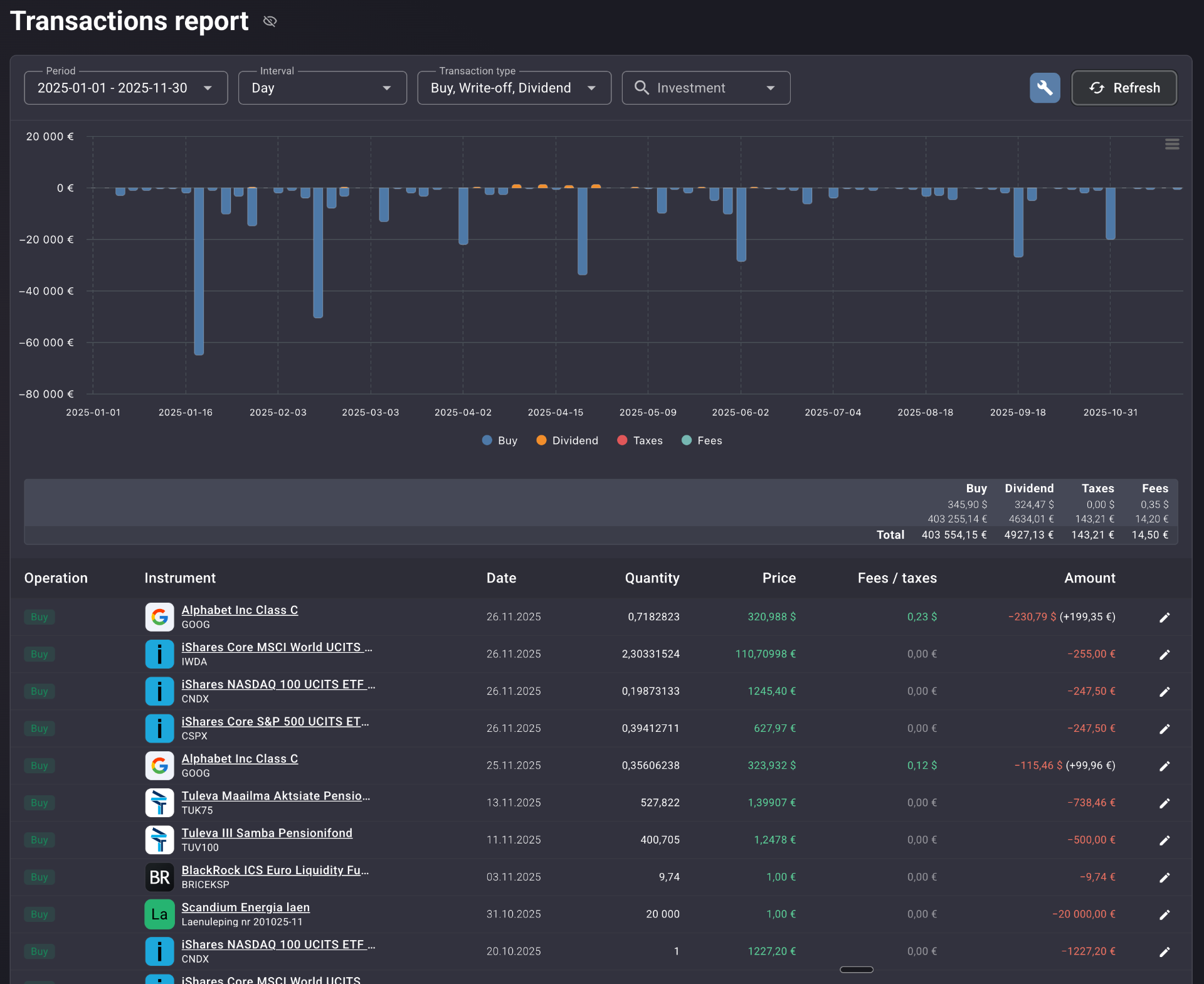
A single chronological table covering buy, sell, dividend, interest, fee, tax, deposit, withdrawal, write-off, rental income, and FX. Each row shows the operation pill, instrument with logo and ticker, the date, quantity, price, fees and taxes itemised in native currency, and the final amount in portfolio currency. Every row carries an inline edit icon — corrections happen on the spot.
See activity at the granularity the question demands
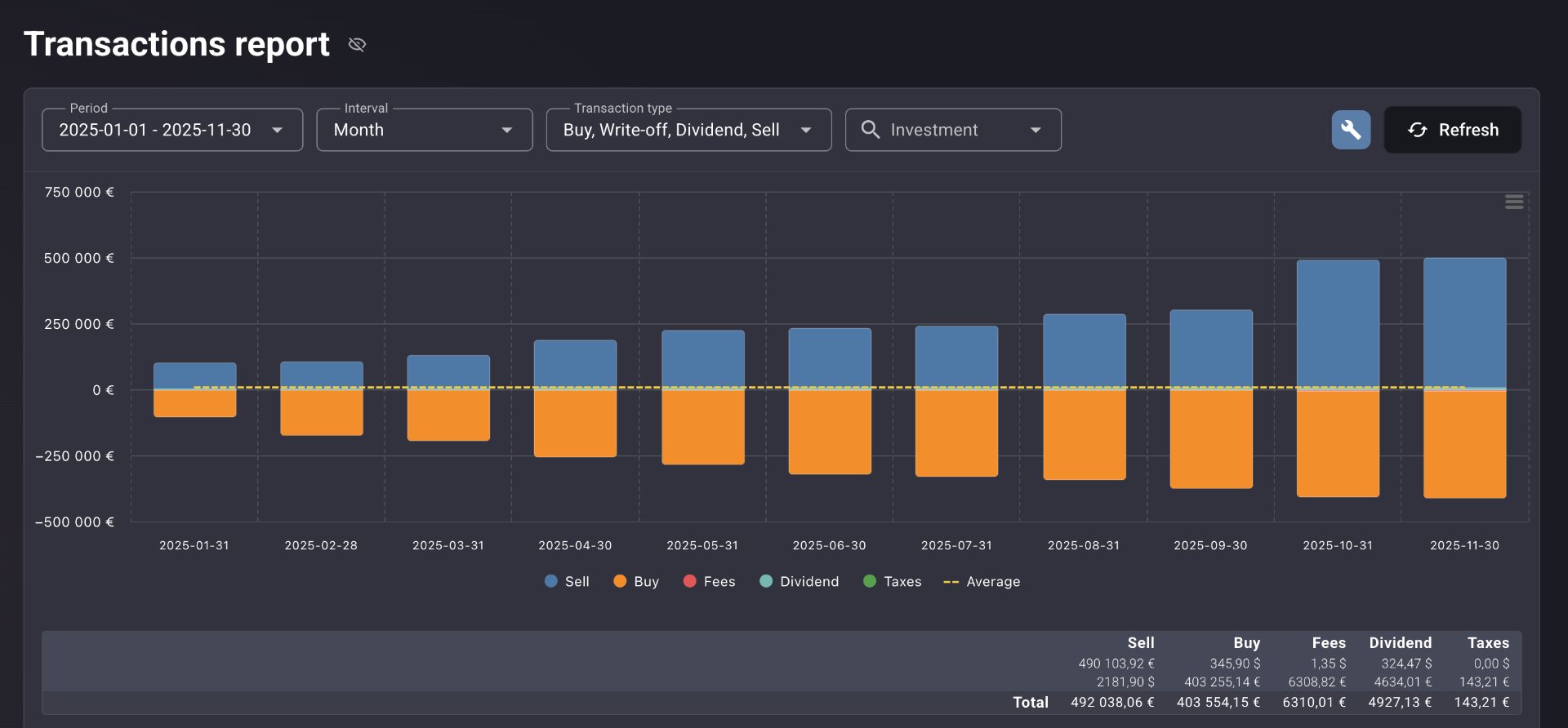
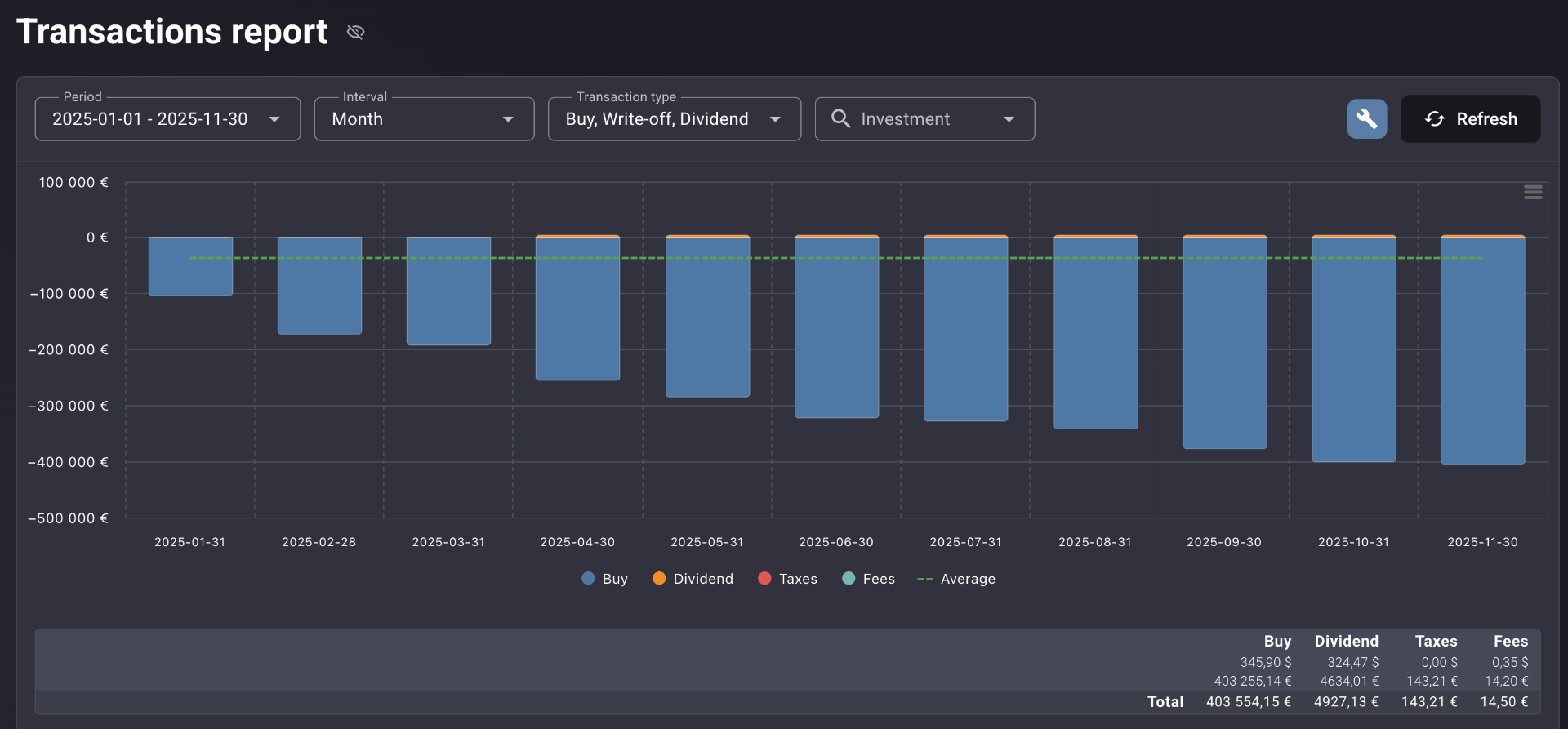
Day, Month, or Quarter — switch the interval and the same ledger rearranges itself. Buys sit below the line as capital deployed, sells above as capital returned. Dividends, fees, and taxes ride alongside in their own colour. A dashed average line runs across the chart, so any period above or below your typical pace stands out immediately.
Totals — by transaction type, by currency
Below the chart, the summary row breaks out totals per type and per currency. EUR and USD shown side by side, then combined into the portfolio-currency aggregate. FX effects are visible at the line level, not buried in a single converted figure. The arithmetic of the year is on the page.
Filter to one event type. Or one instrument. Or both.
Multi-select Transaction type filter — Dividends only, Fees only, Buy and Sell only, or any combination. Searchable Investment filter pulls a single holding's complete history end to end. The chart, the totals row, and the table all update together. Then download the result for your accountant or your records.
Built to be the only ledger you need
Complete event coverage
Buy, sell, dividend, interest, fee, tax, deposit, withdrawal, write-off, rental income, and FX — all in one table.
Day / Month / Quarter intervals
Switch granularity to match the question. A dashed average line gives every period its deployment-pace context.
Multi-select Transaction type filter
Isolate any category or combination — Dividends only, Fees and Taxes only, Buy and Sell only — in one click.
Searchable Investment filter
Pull the full history of a single instrument or issuer. Every event for that holding, end to end.
Multi-currency totals
Per type, per currency, then aggregated to portfolio currency. EUR and USD side by side, then combined.
Inline editing & full export
Correct any manually entered row directly from the report. Download the dataset for tax filing or audit.
Works across public equities, ETFs, listed and unlisted bonds, real estate, loan instruments, crowdfunding, VC funds, crypto, and cash accounts — in a single unified view.
Every angle on your activity
The same ledger, four different reads. The right view depends on the question.
Day interval. Every individual transaction's exact date and size, with the totals summary and the itemised table directly below.
Real-life use cases
Tax season, in five minutes
Filter to Dividend and Interest events for the calendar year. Read the totals per currency from the summary row. Export the table. The accountant gets a clean, itemised record of income received — without a single CSV reconciliation.
The Q4 fee spike
Filter to Fees and Taxes only. Switch the interval to Quarter. Q4 fees are three times the quarterly average — traced back to a period of unusually active trading that nothing else surfaced.
Cost basis in under a minute
Filter to a single instrument. Read the complete buy history with exact dates, quantities, and prices. The figure needed to calculate the realised gain on a partial sale is on the screen.
Fits the way you actually keep records
Tax-optimised investors
Transaction-level records for realised gains, dividends received, interest, and withholding tax — ready for filing or accountant review.
Active traders auditing themselves
How often you traded, how much you spent on fees, whether your activity matches the strategy you say you're running.
Income investors
Separate dividend and interest receipts from capital events. The income side of the portfolio, isolated and totalled.
Multi-platform portfolios
One source of truth across every broker, every custodian, and every asset class. The single ledger you didn't have before.
One transaction history for your entire portfolio
Most broker apps give you a transaction history for that broker. Portfellow gives you one transaction history for your entire portfolio — every platform, every asset class, every event type — in a single table behind a single set of filters.
The bar chart shows the shape of your investing behaviour over time. The totals row does the arithmetic. The download hands the result to whoever needs it. No spreadsheet. No format reconciliation. No missing rows from a platform that only exports the last twelve months.
Suggested workflow
Nine steps from "I have records somewhere" to "I have one ledger I can hand over."
Add all accounts and brokers
Connect or import every broker, custodian, and instrument into Portfellow.
Open the report
Transactions loads as a unified ledger across every account and asset class.
Set the Period
Calendar year for tax. Since-inception for a full audit. Any custom range for a specific question.
Review at Month interval
Read the shape of your activity across the period. Spikes and quiet stretches both visible.
Filter by Transaction type
Dividends for income review, Fees for cost audit, Buy and Sell for capital gains. Or any combination.
Filter by Investment
Drill into one instrument or issuer. Pull the full history end to end.
Read the totals summary
Aggregate figures by type and currency — the arithmetic of the period in one row.
Scroll the itemised table
Find and verify specific events. Native and portfolio currency shown side by side.
Edit or download
Correct any manually entered row in place. Export the dataset for your accountant or your archive.