Feature

    Managing money together shouldn't mean sharing a password.

    Share a single portfolio or your entire account, assign a Viewer or Manager role, and see everything that's been shared with you β€” all without handing over your login.

    Access Management in Portfellow

    Sharing usually means all or nothing

    Most tools force a choice between full account access and no visibility at all.

    Sharing means sharing everything, or nothing

    Without granular roles, giving a family member or advisor visibility usually means handing over full access β€” or none.

    No record of who can see what

    Access granted informally, over email or a shared login, is impossible to track or revoke cleanly later.

    Family portfolios end up in screenshots

    Without real sharing, "keeping everyone in the loop" turns into forwarded PDFs and outdated screenshots.

    Key highlights

    Share a single portfolio or your entire account

    Viewer role for read-only access

    Manager role to allow editing

    Revoke access at any time

    See everything shared with you, in one place

    Deep dive

    Share exactly what makes sense

    Not every relationship needs the same level of access. Share a single portfolio with a financial advisor who only needs to see that one, or open up your entire account to a partner managing finances together with you.

    Access is scoped to exactly what you choose to share β€” nothing more. Anything you haven't explicitly shared stays private.
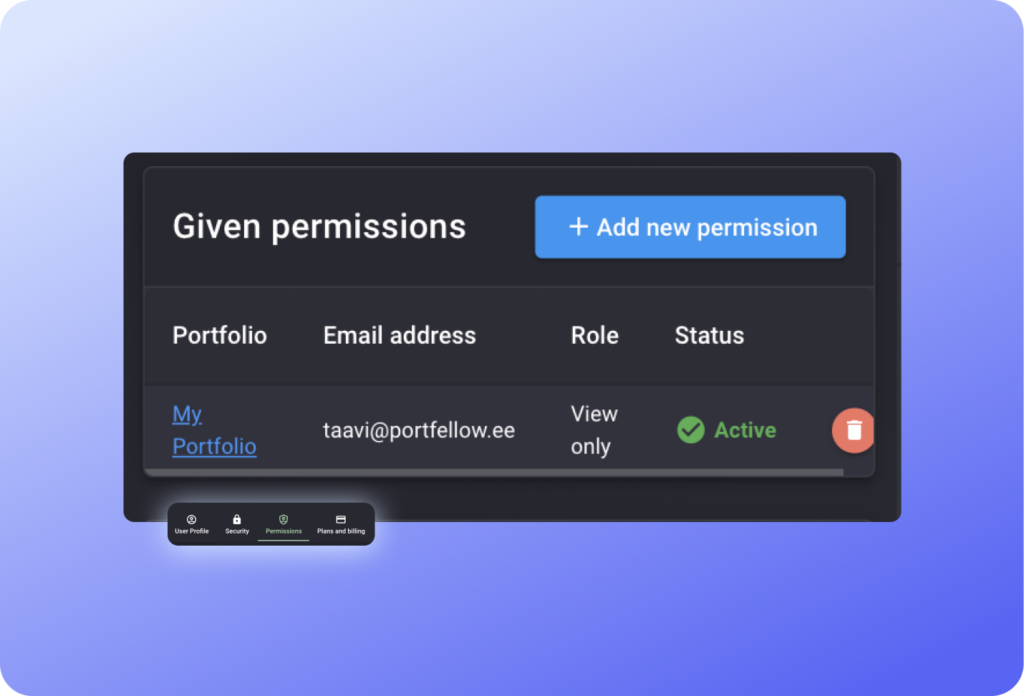
    Sharing a Portfellow portfolio with Viewer and Manager access roles

    Viewer or Manager β€” you decide

    Viewer access is read-only: the person you share with can see holdings, performance, and reports, but can't change anything. It's the right fit for a family member who just wants visibility, or an advisor doing a review.

    Manager access allows editing β€” useful when you actually want someone helping you manage the portfolio day to day, like a spouse or a trusted partner, not just watching from the sidelines.

    Everything shared with you, in one place

    Access management isn't just about what you give away β€” it's also where you see every portfolio and account that other people have shared with you, all in one overview instead of scattered across separate logins.

    Whether it's a family member's portfolio you help manage or a joint account you both watch, it shows up right alongside your own.

    How it works

    1. 1

      Choose what to share

      Pick a single portfolio, or your entire account, for the person you want to grant access to.

    2. 2

      Assign a role

      Set them as Viewer for read-only access, or Manager if they should be able to edit.

    3. 3

      Revoke anytime

      Change or remove access whenever you want β€” nothing is permanent.

    Built for

    The family portfolio manager

    Manages money with or for family β€” a spouse, a parent, an adult child β€” and wants everyone to see the same honest numbers without merging accounts.

    • Share a family portfolio with the right role for each person
    • Keep personal and shared holdings cleanly separated
    • See any portfolios shared with you from family

    The advisor collaborator

    Works with a financial advisor or partner who needs real visibility β€” or real editing rights β€” without getting your full account credentials.

    • Viewer access for advisors who just need to see the numbers
    • Manager access for hands-on collaboration
    • Revoke access the moment the relationship changes

    Frequently asked questions

    Share access, not your password.

    Viewer or Manager roles, scoped to exactly what you choose β€” revoke anytime.