Feature

    Stop exporting CSVs. Just ask.

    Connect Claude or any MCP-compatible AI assistant to your live portfolio and ask questions the way you'd ask an analyst β€” grounded in your real numbers, always read-only.

    AI Analyst Reports in Portfellow

    Getting one answer shouldn't take five dashboards

    Most of the time, you don't need a new report β€” you just need a question answered.

    One question, five dashboards

    Concentration here, dividend income there, performance somewhere else β€” answering one real question means digging through several views.

    Spreadsheets can't hold a conversation

    You can't ask a spreadsheet a follow-up question. Every new angle means rebuilding the analysis from scratch.

    A real analyst costs real money for a quick question

    Most of what you want to know doesn't need a paid consultation β€” it needs someone to read the numbers and explain them.

    Key highlights

    Connect Claude or any MCP-compatible AI assistant

    Ask questions about your portfolio in plain language

    Analyst-style breakdowns: allocation, concentration, performance

    Strictly read-only β€” it can never move money or place trades

    Works from the same live data already in your dashboard

    Deep dive

    Your portfolio, one conversation away

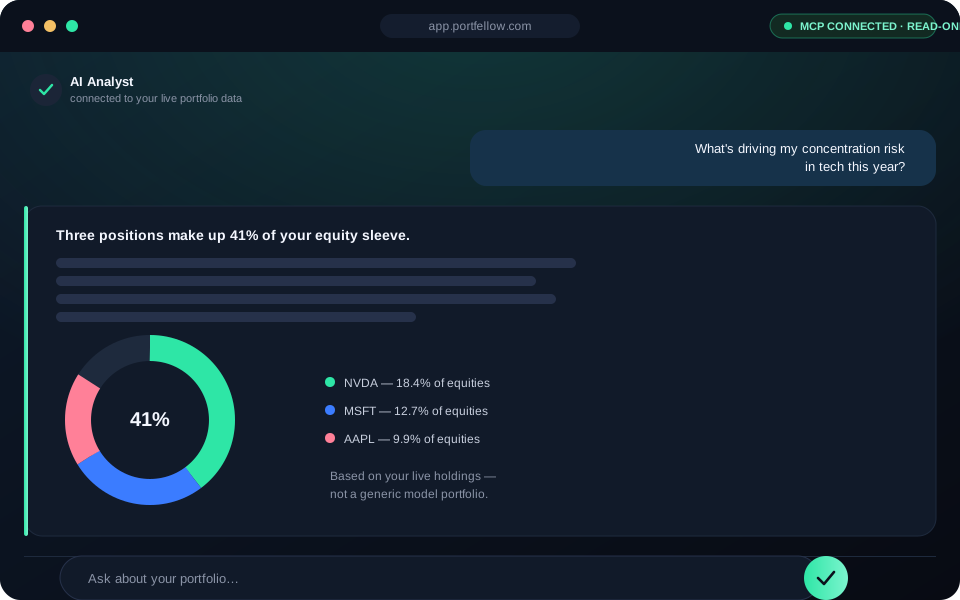
    Instead of digging through charts and reports yourself, connect an MCP-compatible AI assistant and just ask: "what's dragging down my returns this year?" or "how concentrated am I in tech?". It answers using your actual holdings and transactions, not generic advice.

    This uses the same MCP standard that's connecting AI assistants to all kinds of tools β€” Portfellow is one of the data sources it can read from, with your explicit permission.

    Analysis, not just numbers

    Your dashboard already calculates performance, concentration, allocation, and dividend income. An AI assistant connected over MCP can pull all of that together into a written analysis β€” the kind of narrative summary a junior analyst might hand you, grounded entirely in your own data.

    Ask follow-up questions the way you would in a conversation β€” "compare that to last year" or "what would this look like without my largest position?" β€” instead of re-running reports by hand.

    An AI assistant analyzing a Portfellow portfolio over a read-only MCP connection

    Read-only, always

    The connection only grants read access to your portfolio data. It can never initiate a transaction, move funds, place a trade, or alter any asset in your account β€” under any circumstance.

    You stay fully in control: you decide what's connected, and you can revoke access at any time.

    How it works

    1. 1

      Connect

      Enable the Portfellow MCP connection and link it to Claude or another MCP-compatible AI assistant.

    2. 2

      Ask

      Ask about your portfolio in plain language β€” no exports, no formulas, no dashboards to dig through.

    3. 3

      Get a grounded analysis

      Your assistant reads your live data and responds with an analysis based on your actual numbers, not generic advice.

    Built for

    The DIY analyst

    Wants a second pair of eyes on their portfolio without paying for an advisor or building the analysis by hand.

    • Ask for a concentration or allocation breakdown anytime
    • Get a written summary instead of raw numbers
    • No exporting data or building spreadsheets

    The busy optimizer

    Tracks a serious, multi-account portfolio and wants a fast answer instead of digging through every report.

    • Quick answers grounded in real, live data
    • Follow-up questions in plain conversation
    • Same data as your dashboard, no extra setup

    Frequently asked questions

    Ask your portfolio a question. Get a real answer.

    Connect Claude or any MCP-compatible AI assistant β€” grounded in your live data, always read-only.